Calculator Extension for Chrome
A free scientific calculator for Chrome that opens as a toolbar popup, a side panel, or a floating calculator that stays on top while you work.

A scientific calculator, right where you work
You're in the middle of homework, a lab report, or a spreadsheet, and you need a scientific calculator. So you reach for your phone, dig out an old Casio, or open one more browser tab, and every switch pulls you out of what you were doing.
Tetra Scientific Calculator is a free calculator extension for Chromethat opens right where you're working: a toolbar popup, a side panel next to your page, or a floating calculator that stays on top of whatever you're reading.
Type the problem, read the answer, and keep going. Every result is saved, so multi-step work never means retyping.
Three ways to calculate
The same calculator is available wherever you are working, so your numbers follow you from one page to the next.
- Popup for quick math: one click on the toolbar, then it stays out of your way.
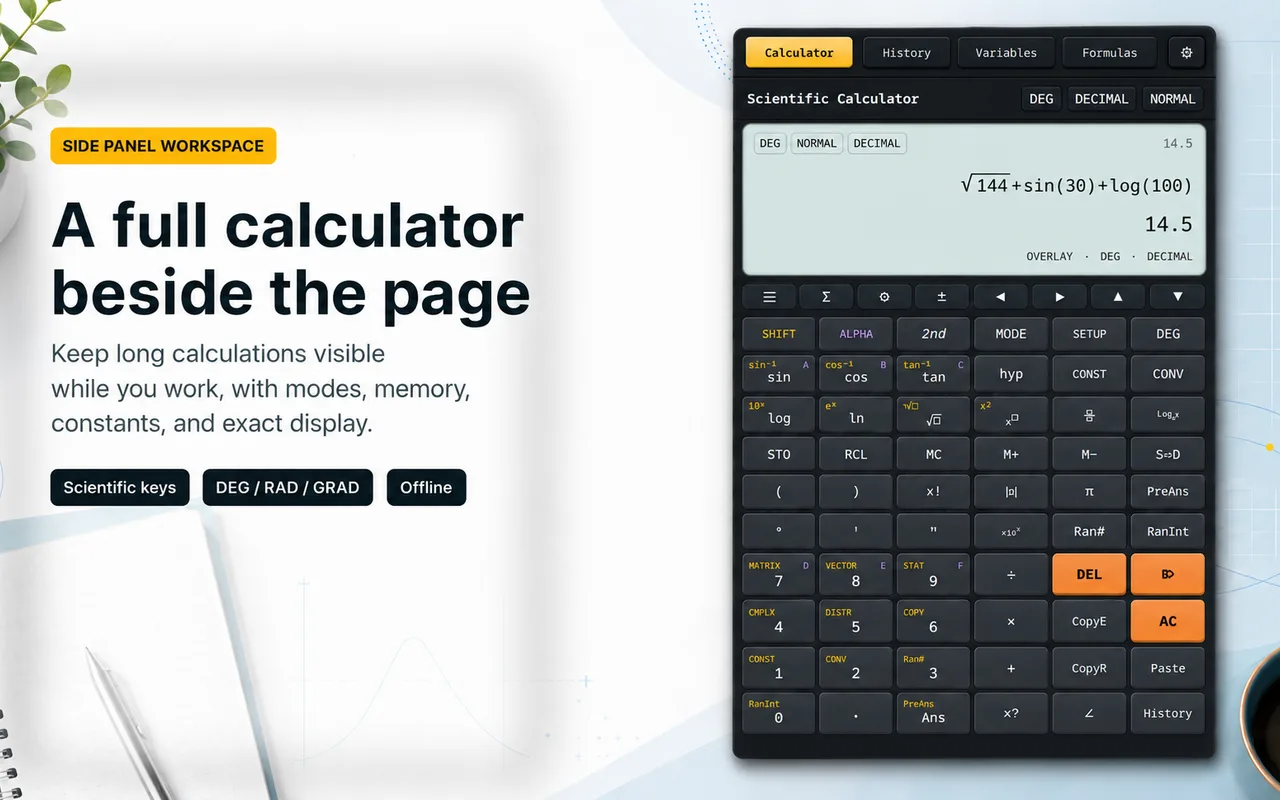
- Side panel calculator: a full workspace with history, variables, formulas, and the unit converter, kept open beside your page while you scroll.
- Floating calculator: keep it on top of any document, PDF, quiz, or dashboard while you read. Launch it any time with
Ctrl+Shift+Y.
Every function you expect from a scientific calculator
- Trigonometry in DEG, RAD, and GRAD: sin, cos, tan, csc, sec, cot, and their inverses.
- Logarithms and exponentials: log, ln, 10^x, e^x.
- Powers, roots, factorial, percent, parentheses, absolute value, π and e.
- Normal, Fixed, Scientific, and Engineering output modes with calculator-style ×10^N display.
- Type with your physical keyboard and enter expressions the way you would write them.
Never lose a result again
Every result lands in a searchable history you can favorite, copy, reuse, and export to JSON or CSV. Nothing disappears when you close the tab.
Use Ans and PreAns to feed one answer into the next step, and store your own values in variables A to Z. Long calculations chain together the way they would on a real calculator.

Convert units without leaving the calculator
A unit converteris built in for length, area, volume, time, pressure, weight and mass, temperature, and fuel consumption. Convert a value, then insert the result straight into the calculation you're working on.
Every formula, one search away
Forgot the quadratic formula or the volume of a cone? Search the built-in formula hub across Algebra, Geometry, Trigonometry, Calculus, Probability, Statistics, Physics, and Chemistry, and drop a formula directly into the calculator to fill in the numbers.

Chrome's built-in calculator vs. Tetra
Chrome and ChromeOS do not ship a real scientific calculator. The built-in options handle quick arithmetic, and the ChromeOS calculator app was removed in a recent update. If you want a proper calculator on Chrome, an extension adds one that stays a click away on every tab.
Tetra gives you the full scientific function set, three surfaces (popup, side panel, and floating), calculation history, variables, a unit converter, and a formula hub, which covers what the built-in calculator leaves out. It works well on Chromebooks, where a real scientific calculator is one click away instead of an app install.
Who uses it
- Students and teacherskeep it open for homework, labs, and exam prep, and it works well on Chromebooks where installing an app isn't an option.
- Engineers and scientistsrun quick sanity checks without leaving the spec, paper, or dashboard they're reading.
- Finance and analysts work percentages and powers and keep an exportable trail of every calculation.
Free, and it stays on your device
Every feature and every theme (Light, Dark, and OLED Black) is free, with no ads and no account. The extension runs on your device, so it opens instantly and keeps working without internet. It asks for minimal permissions and never reads your page content to do the math.
Prefer to calculate without installing anything? Use the web version of the scientific calculator right in your browser.
Add it to Chrome, and the next time you need a scientific calculator it's one keystroke away.
Frequently asked questions
What is the best calculator extension for Chrome?
Tetra Scientific Calculator is a free scientific calculator extension for Chrome. It works three ways (a toolbar popup, a side panel, and a floating calculator that stays on top of any page), and it includes calculation history, variables, and a built-in unit converter. Everything runs on your device, so it works offline, with no ads and no account required.
How do I add a calculator to Chrome?
Open the Chrome Web Store listing, click "Add to Chrome", then confirm. The calculator appears on your toolbar. Click the icon for the popup, open the side panel to keep it beside your page, or press Ctrl+Shift+Y to launch the floating calculator over whatever you are reading.
Does the calculator extension work offline?
Yes. Every calculation runs locally in your browser, so the extension opens instantly and keeps working without an internet connection. Your history, variables, and settings are stored on your device, not uploaded.
Is the calculator extension free?
Yes. Every feature and every theme is completely free, with no ads and no account.
What can the scientific calculator do?
Trigonometry in degrees, radians, and gradians; logarithms and exponentials; powers, roots, factorial, percent, parentheses, π and e; and Normal, Fixed, Scientific, and Engineering output modes. It also keeps a searchable history, supports variables A to Z, includes a unit converter, and has a searchable hub of formulas you can insert into a calculation.