You can use the fig calculator when you need to count significant figures in a number. It helps you check which digits count or round a value to a chosen number of figures. The sig fig calculator is useful for chemistry homework, physics labs, engineering notes, dimensional analysis and any report where the number of written digits should match the precision of the measurement.
Quick start
-
Type the number exactly as it appears in your problem or lab notes.
-
Use decimals, commas, signs, e notation or a form like 3.50 x 10^3.
-
Set Round to for the number of figures you want in the final answer.
-
Check figures, Rounded number and the digit-by-digit breakdown.
-
If a whole number ends in zeros decide whether those zeros are placeholders or measured digits before you report the result.
For example 0.004560 has 4 figures: 4 5, 6 and the final 0. Rounded to 3 figures it becomes 0.00456.
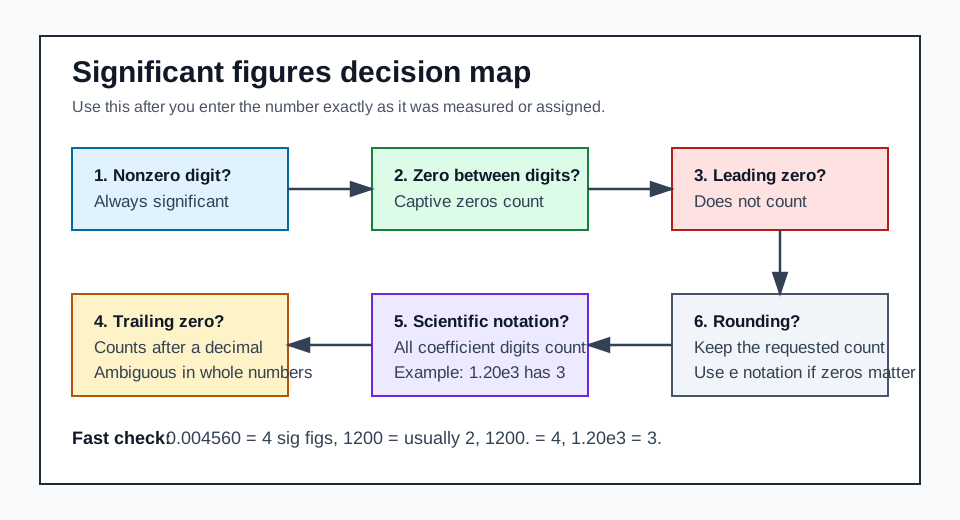
What the calculator accepts
| Input style | Example | How it is read |
|---|---|---|
| Whole number | 1200 | Usually 2 significant figures because trailing zeros are ambiguous placeholders |
| Whole number with decimal point | 1200. | 4 Significant figures because the decimal point makes the trailing zeros explicit |
| Decimal number | 0.004560 | 4 significant figures because leading zeros do not count and the final decimal zero does |
| Scientific notation | 1.20e3 | 3 significant figures because the coefficient 1.20 is explicit |
x 10^ notation | 3.50 x 10^3 | Normalized to 3.50e3 and counted as 3 significant figures |
| Signed values | -0.0250 | The minus sign does not count; the number has 3 figures |
| Comma separators | 12,300.0 | Commas are removed before counting |
The sig fig calculator is intentionally strict about invalid text. If you type units into the number field, such as 12.0 cm remove the unit. Enter only 12.0. Keep the unit in your notes or final answer.
Significant-figure rules
| Rule | Counts? | Example | Result |
|---|---|---|---|
| Nonzero digits always count | Yes | 245 | 3 |
| Zeros between nonzero digits count | Yes | 1005 | 4 |
| Leading zeros do not count | No | 0.0052 | 2 |
| Trailing zeros after a decimal count | Yes | 25.00 | 4 |
| Trailing zeros in whole numbers are ambiguous | Depends | 2500 | usually 2 |
| Scientific-notation coefficient digits count | Yes | 2.50e3 | 3 |
The practical rule is simple: start counting at the nonzero digit then keep counting until the precision stops. A point or scientific notation tells the reader that written trailing zeros are intentional precision, not just place value.
Examples you can check
| Number | Significant figures | Significant digits | Why |
|---|---|---|---|
7 | 1 | 7 | One nonzero digit |
73 | 2 | 7, 3 | Both digits are nonzero |
0.0637 | 3 | 6, 3, 7 | Leading zeros only locate the decimal point |
30.00 | 4 | 3, 0, 0, 0 | Decimal trailing zeros show measured precision |
5200.38 | 6 | 5, 2, 0, 0, 3, 8 | Captive zeros count |
78800 | 3 | 7, 8, 8 | Final zeros are placeholders unless marked otherwise |
78800. | 5 | 7, 8, 8, 0, 0 | Decimal point marks the final zeros as significant |
1.20e3 | 3 | 1, 2, 0 | Scientific notation removes ambiguity |
How rounding to sig figs works
Rounding to figures keeps a set number of meaningful digits no matter where the decimal point sits. The calculator uses decimal arithmetic. Displays scientific notation when that is the clearest way to preserve requested trailing zeros.
| Input | Round to | Rounded result | Note |
|---|---|---|---|
24.0725 | 3 | 24.1 | The next digit is 7, so the 0 rounds up |
0.004560 | 4 | 0.004560 | The trailing zero is kept because 4 sig figs were requested |
2648 | 3 | 2.65e+3 | Scientific notation avoids the ambiguous form 2650 |
999.5 | 3 | 1.00e+3 | Rounding carries into the next power of ten |
1.20e3 | 2 | 1.2e+3 | The result keeps 2 coefficient digits |
If your teacher or lab format requires decimal notation you can rewrite 2.65e+3 as 2650 but remember that 2650 by itself can look like 3 or 4 significant figures depending on convention. Scientific notation is usually safer when trailing zeros matter.
Addition, subtraction, multiplication, and division
This calculator counts and rounds one entered number. It does not evaluate full expressions like 3.14 / 7.58 - 3.15. If you are doing arithmetic by hand or with the scientific calculator, use these reporting rules:
| Operation | Rule for final answer | Example |
|---|---|---|
| Addition/subtraction | Round to the least precise decimal place | 12.11 + 18.0 = 30.1 because 18.0 is precise to tenths |
| Multiplication/division | Round to the fewest significant figures among measured values | 4.18 / 2.33 = 1.79 because both inputs have 3 sig figs |
| Exact counted values | Do not limit significant figures | 4 trials or an exact conversion factor does not reduce precision |
| Mixed operations | Keep guard digits until the final step | Round the final answer, not every intermediate line |
For arithmetic-heavy homework, pair this with the scientific calculator. Calculation errors and significant-figure errors often happen in the same line of work.
Common mistakes and fixes
| Mistake | Why it is wrong | Fix |
|---|---|---|
Counting leading zeros in 0.0034 | They only set the decimal position | Count 3 and 4: 2 sig figs |
Treating 1200 and 1200. as the same precision | The decimal point changes the meaning | Use 1200. or 1.200e3 when all zeros count |
| Rounding every intermediate step | Early rounding can move the final answer | Carry extra digits, then round once at the end |
| Letting exact conversion factors limit precision | Defined factors are exact for sig-fig purposes | Let the measured value decide the final sig figs |
| Pasting units into the number field | The calculator expects a numeric value only | Enter 12.0, then write cm in your final answer |
Edge cases and limitations
- Zero-only values:
0,0.0, and0.00are context dependent. A measured0.00 gcan communicate instrument resolution, but a pure sig-fig counter cannot infer the measurement context. - Whole-number trailing zeros:
5000is ambiguous. Use5000.,5.000e3, or an overline notation in handwritten work if the zeros are meant to count. - Rounding mode: Decimal rounding follows the standard half-up style most students expect in introductory science classes. If your course uses half-even rounding, check that rule with your instructor.
- No uncertainty propagation: Significant figures are a reporting convention. They are not a full uncertainty analysis.
- No expression solving: Use this page to count and round a final number. Use the scientific calculator for arithmetic, then bring the result back here if you need a sig-fig check.
Why sig figs matter
Significant figures keep a result from pretending to be more precise than the data behind it. If a ruler gives you 12.5 cm, reporting 12.5000 cm implies precision you did not actually measure. If a balance gives 0.004560 g, dropping the final zero loses precision the instrument did report.
The best habit is to write the measured value exactly, keep a few guard digits while calculating, and round only the final reported answer.
Video refresher
Related tools
- Scientific Calculator - evaluate arithmetic, powers, logarithms, and trig before applying sig figs.
- Matrix Calculator - check linear algebra outputs before reporting rounded values.
Sources and further reading
- Khan Academy significant figures practice - useful for checking the basic counting rules.
- Wolfram MathWorld: Significant Digits - concise mathematical definition tied to uncertainty.
- NIST Guide to the SI, Appendix B - reference for conversion factors and SI use when sig figs appear in unit conversions.
FAQs
No. Leading zeros only locate the decimal point.
Trailing zeros after a decimal point are significant; trailing zeros in whole numbers may be ambiguous without a decimal point or scientific notation.
1200 is usually treated as 2 significant figures unless a decimal point, overline, or scientific notation shows that one or both trailing zeros are measured digits.
1200. has 4 significant figures because the decimal point makes the trailing zeros explicit.
Yes. Inputs such as 1.20e3 and 3.50 x 10^3 are supported, and the digits in the coefficient determine the significant-figure count.
Scientific notation preserves requested trailing zeros without ambiguity. For example, 999.5 rounded to 3 significant figures is clearer as 1.00e+3 than 1000.
No. This tool counts and rounds one number. For arithmetic, solve the expression first, then use this calculator to check the final significant figures.
No. Exact counted values and defined conversion factors do not limit significant figures; measured values and approximate factors do.